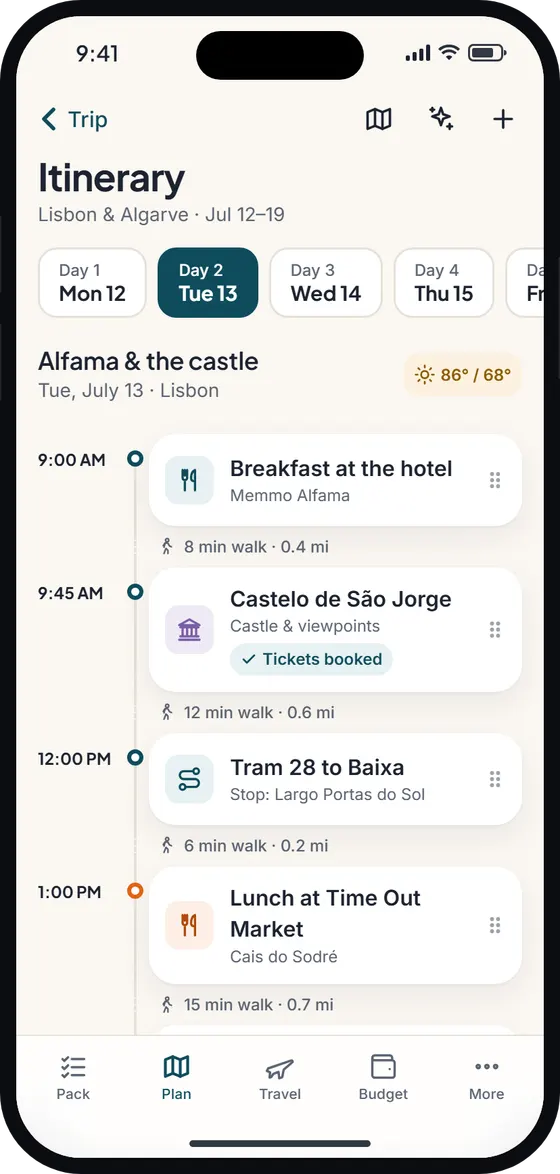


A day-by-day itinerary planner app
Wayfold’s Plan tab is a timeline for each day of your trip. Add an activity, attach a place, set a time and jot down notes – a booking reference, who’s meeting where, the table you reserved. Drag and drop to reorder when plans change.
Each day shows the weather in °F or °C, and travel time and distance between stops by walking, driving or transit. If a place keeps opening hours, Wayfold warns you when it’s closed on the day you picked – handy for museums that close on Mondays.
Your flights, hotel check-in, car hire (rental car) pick-up and other bookings appear on the right day, at local time, alongside your activities. An overnight flight shows on both days. See the travel planner for how bookings work.
Where the trip planner meets the packing list
Most trip planners stop at the itinerary. Wayfold carries on. When you add “Day 3: Hiking, Yosemite”, it suggests hiking boots, a warm layer, sunscreen and a daypack. Add a surf lesson and it offers swimwear and a towel. A sheet asks “Add these to your list?”, you toggle what you want, and the items land on your packing list with a “From Day 3” badge.
It works the other way too: delete the activity and Wayfold asks whether to remove the items it added for it. Your plan and your suitcase stay in step without you keeping two lists in your head.
An itinerary planner with a map, routes and things to do
Every day has a map view with numbered stops in order. The route planner can put a day’s stops in a quicker order, and one tap opens the day in Google Maps or Apple Maps. Looking for ideas? Browse things to do at your destination, save places to a “Places to visit” wishlist, and drop them into a day when you’re ready.
An AI draft, if you want one
Type something like “4 days London with teens, museums and food, mid budget” and Wayfold drafts an itinerary you can use or try again. The draft is fully editable – it’s a starting point, not a script. Drafts use your AI allowance: 3 a month on Free, unlimited on Pro. AI features need a free sign-in. More on the AI trip planner page.
How Wayfold compares
| Capability | Wayfold | Typical packing app | Typical itinerary app |
|---|---|---|---|
| Day-by-day timeline with drag and drop | Yes | Rarely | Yes |
| Map of each day’s stops | Yes | Rarely | Often |
| Weather per day on the plan | Yes | Sometimes | Sometimes |
| Activities add items to the packing list | Yes, after you confirm | Usually not | Usually not |
| Bookings shown on the timeline | Yes | Rarely | Often |
| Plan works offline | Yes | Varies | Varies |
A free trip planner app that works offline and with friends
Your itinerary is stored on your phone, so it opens on a plane, in a national park or abroad without roaming. You can add free-text activities offline; place search, weather and AI drafts need a connection, and your edits sync when you’re back online.
The trip planner app is free, with unlimited trips, maps, weather and travel times. Planning a trip with friends or family is a Pro feature: invite them by link as viewers or editors and everyone sees changes live. Pro also adds unlimited AI drafts. You can sync your plan to your Apple or Google calendar.
Wayfold is coming soon to iPhone and Android.
Questions about the trip planner
Is the Wayfold trip planner app free?
Yes. Planning unlimited trips day by day, with maps, weather and travel times, is free. AI itinerary drafts use the monthly allowance – 3 on Free, unlimited on Pro. See pricing.
Can I plan a trip with more than one destination?
Yes. A trip can have several destinations – Lisbon then the Algarve, say – across one date range, and each day sits under the right place.
Does the itinerary planner work offline?
Yes. Your plan, notes and bookings are on your phone. Searching for places, weather and AI drafts need internet; changes sync when you reconnect.
Can I plan a trip with family or friends?
On Pro, invite people by link as viewers or editors. Edits and ticks sync in real time once everyone has signed in.